
Svelte: A Quick Introduction

What is Svelte? 🙋♀️
Svelte stands out as an open-source front-end framework designed to craft dynamic and engaging user interfaces within web browsers.
Tell me more...⬇️
It takes a unique approach – acting as a compiler, not just a framework – resulting in faster performance compared to counterparts like ReactJS, AngularJS, and VueJS. Svelte is ideal for building reactive web applications, ensuring instantaneous updates whenever data changes.
It excels in rapid application development (RAD), allowing the swift creation of minimally coded software applications. Additionally, Svelte plays a pivotal role in web optimization, distinguishing itself by avoiding the use of a virtual DOM.
When it comes to deployment, Svelte stands apart; there's no need to deploy it separately, streamlining the process and contributing to its rapid execution.
Prerequisites 🎒
Before diving into Svelte, ensure the following prerequisites are in place:
Any text editor (e.g., VS Code, Atom, etc.).
NodeJS is installed on your system.
Installation Steps 🔨
Step 1: Install Degit
Open your command prompt or terminal and install the 'degit' package globally:
npm install -g degit
Step 2: Create a Svelte Project
Create a directory on your desktop and run the following command:
degit sveltejs/template project-name
Step 3: Project created.
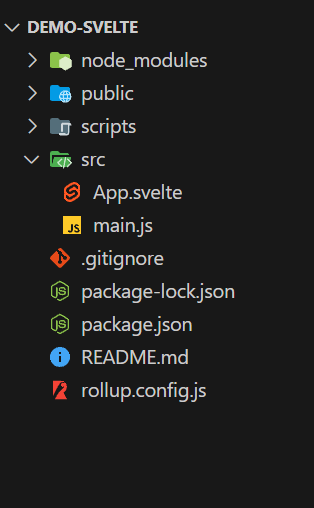
Open it in your text editor. In 'src', find main.js (the Svelte app executor), App.svelte (the root component), and check package.json for dependencies. Ready to roll! 🚀
Step 4: Navigate to Project Directory
Ensure you are in your project directory:
cd project-name
Step 5: Install Dependencies
Install project dependencies:
npm install
Step 6: Start the Development Server
Create a local development server to run your application:
npm run dev

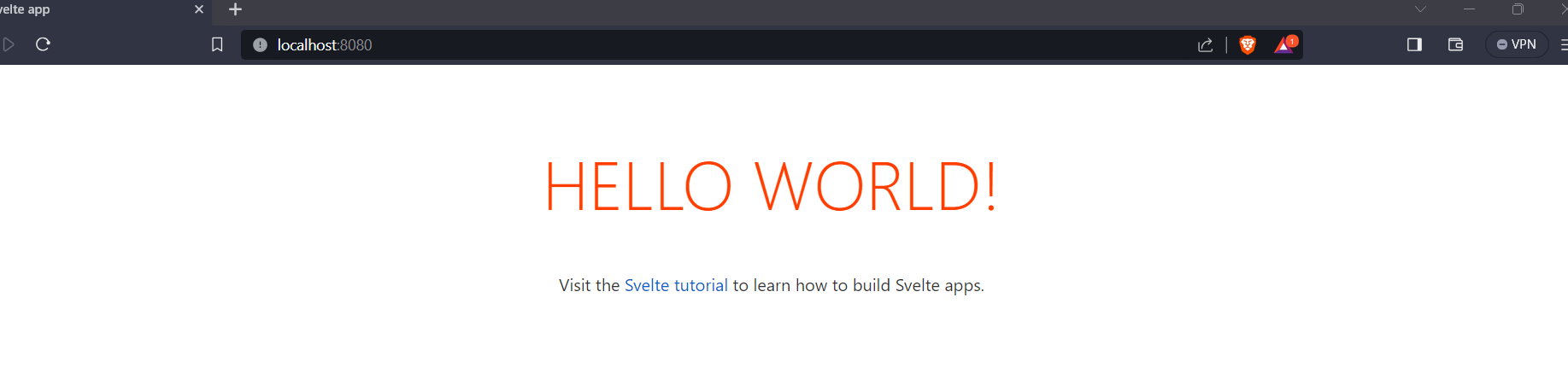
Step 7: Follow the Link
Open the provided link in your browser to explore and develop your Svelte application further.
Thats it..!

Congratulations on Choosing Svelte! 🎉 Get ready to code at warp speed. Time to sprinkle some magic on your web development journey with Svelte's lightning-fast vibes! 🚀✨
Happy Coding🤠
About the author
Unleashing the power of code in its natural habitat 🚀 | Software Engineer & Architect 💻 | ML Enthusiast 🤖 | Game Design Maverick 🎮 | Crafting the future one line of code at a time! 🔮✨
Comments
Join the discussionNo comments yet. Be the first to comment.


